Other
The Beeps system in VirtualCoach provides auditory cues to support your driving performance. While it is not a visual overlay, it functions alongside other overlays to enhance timing and consistency, especially in braking and throttle application. to help you improve your timing and consistency when approaching corners. This audio-based feedback system alerts you with a series of beeps related to braking and throttle events, supporting better muscle memory and focus without needing to look at visual overlays.
Overview
Section titled “Overview”Beep sequences are designed to indicate when braking and throttle events should occur based on coach/reference data.
How it works
- Pre Beeps (x3): Three short beeps before the braking point — act as a countdown.
- Brake Beep: A single beep exactly when braking should begin.
- Lift Only Beep: A unique tone that plays when a lift is required instead of full braking.
- Throttle Beep: A single beep when throttle application should begin.
This sequence ensures you are ready for critical input moments, enhancing your awareness and timing, especially in high-speed or blind sections of a track.
Usecase
Section titled “Usecase”The Beep Overlay is particularly helpful for:
- Practicing consistent braking points.
- Learning new tracks where visual references aren’t memorized yet.
- Reinforcing throttle timing in tricky or technical sections.
- Driving in VR or screen-limited setups where visual overlays are harder to follow.
Settings
Section titled “Settings”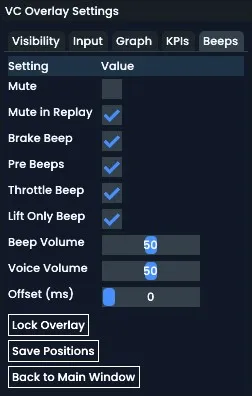
Access these options via Adjust Overlay > Beeps tab.
| Setting | Description |
|---|---|
| Mute | Mutes all beeps entirely. |
| Mute in Replay | Disables beeps when watching a replay. |
| Brake Beep | Enables/disables the brake initiation beep. |
| Pre Beeps | Toggles the 3 pre-braking countdown beeps. |
| Throttle Beep | Enables/disables the throttle application beep. |
| Lift Only Beep | Plays a beep only when a lift is required instead of full braking. |
| Beep Volume | Adjusts volume for beeps. |
| Voice Volume | Lesson voice volume (if enabled). |
| Offset (ms) | Adjusts the beep timing to play slightly earlier than the reference point. This is helpful to compensate for reaction time or system latency. |
Beep configuration allows for full customization depending on how much audio guidance you want.
Beep cues provide a minimal-distraction, high-impact training method and are especially useful when combined with other visual overlays like Input or Turn Analysis.