Turn Rating
The Turn Rating Overlay in VirtualCoach gives instant feedback on your performance through each corner by comparing your lap to the coach/reference data. It simplifies corner analysis into a single performance score, with supporting metrics for deeper insight.
Reference
Section titled “Reference”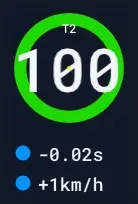 | 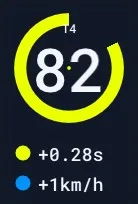 | 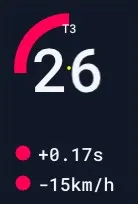 |
|---|
This overlay evaluates your performance for each turn, scoring it from 0 to 100, where 100 is a perfect match with the coach/reference and 0 indicates the poorest result.
Display Breakdown
Section titled “Display Breakdown”| Element | Description |
|---|---|
| Score (0–100) | Overall performance rating for the turn. |
| Turn Label (T#) | Indicates which turn this rating refers to (e.g., T3, T4). |
| Time Delta | Shows the time lost or gained vs. reference lap. (e.g., +0.28s = slower). |
| Exit Speed Delta | Shows how much faster or slower your exit speed was (e.g., -15km/h = slower). |
| Color Ring | Visual cue: yellow/green for decent/good performance, red for poor. |
The score ring color and numerical value provide a quick assessment, while the two supporting deltas explain why the score is what it is.
Usecase
Section titled “Usecase”The Turn Rating Overlay is ideal for:
- Quickly identifying which corners need improvement.
- Understanding whether time loss was due to slow corner speed or low exit speed.
- Prioritizing which turn to review next using other overlays like Turn Rating or one of the lessons.
This overlay helps you decide where to focus your analysis without needing to scan the entire lap timeline manually.
Settings
Section titled “Settings”There are no specific settings for this overlay.
- The display is fixed in format.
- You can move and resize it freely like any other overlay.
- Be sure to click Save Positions after adjusting placement.
The Turn Rating Overlay delivers high-level corner performance insight in real-time and is a powerful first step toward targeted improvement.